The PACS Server

The PACS Server
The Compress Data action compresses data stored in a repository which is intended for recovering some storage space by compressing data that is no longer used.
Set up an action to compress data as follows:

 icon
icon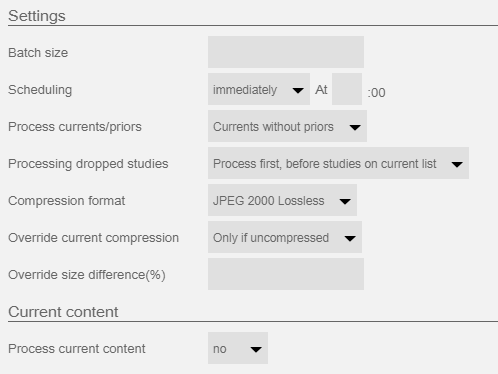
A Configure Compress Data page will appear for the selected worklist filter:
Batch size - maximum number of studies to process each cycle
Scheduling - instructs the server when to process the data (usually immediately upon arrival)
Process current/priors - instructs server how to handle currents and relevant priors. Options include the following:
Currents without priors
Currents and relevant priors
Relevant priors without currents
Currents and all priors
All priors without currents
Processing dropped studies - defines how to handle studies that no longer match the criteria when the batch gets processed. Options include the following:
Process first, before studies on current list - process the backlog before processing new studies matching the criteria
Process last, after studies on current list - process new studies matching the criteria before processing the backlog
Do not process - Drop the backlog
Compression format
JPEG Lossless
JPEG 2000 Lossless
JPEG Lossy
Override current compression
Always - always apply the configured format
Only is uncompressed (default) - compress to the configured format only if data is uncompressed
If not in an supported compression format - compress to the configured format if the current format is not one of the available compression formats
Override size difference (%) - compresse dfile is saved if size difference exceeds the defined percentage value. An Empy or zero value disables the check and the compressed file is saved regardless of resulting size difference.
Process current content - server will process all data on current worklist (not recommended)
To disable the compress data action:
icon