Provider Portal
Summary
This enhancement to Provider Portal introduces the ability to capture ICD10 diagnosis codes during scheduling on the portal.
Previously, entering ICD10 codes was supported from the RIS Client, but the Provider Portal only supported a free form Reason for Exam field at the Order Level. However, there are many workflows that require an ICD10 code in order to automate processes.
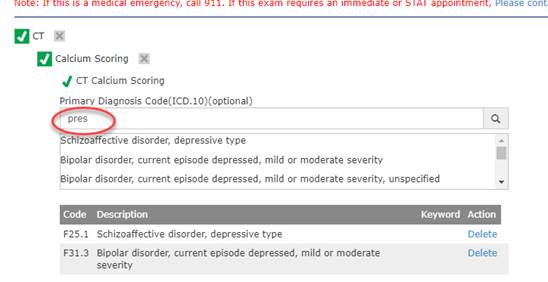
With this change, the Provider Portal now allows users to enter the Primary Diagnosis Code (ICD10) code for the exam, and optionally, additional ICD10 codes as well as an optional reason for order freetext field.
When searching for ICD10 codes, a minimum of 3 characters (configurable by the Service Team) must be entered.
Multiple diagnosis codes can be selected.
When no ICD10 code is entered, the What is the reason for your order? freetext field is required.
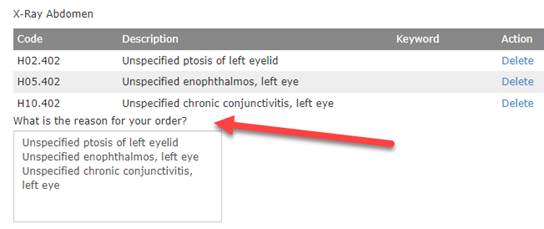
The reason is optional when the primary ICD is specified.
As expected, these values can be viewed and edited from the RIS Client. When multiple ICDs are entered, the Primary ICD will be mapped to the first position for the Study Level Indication Codes, with any additional ICD codes listed after that primary code.
Configuration Instructions
Service Team assistance is required to enable this feature.