Patient Portal
Summary
This enhancement to Patient Portal introduces the ability to reschedule appointments via an iCode within the Patient Portal.
Background
Previously, users of the Patient Portal would need to first log into their account and take additional steps to reschedule appointments.
Feature Description
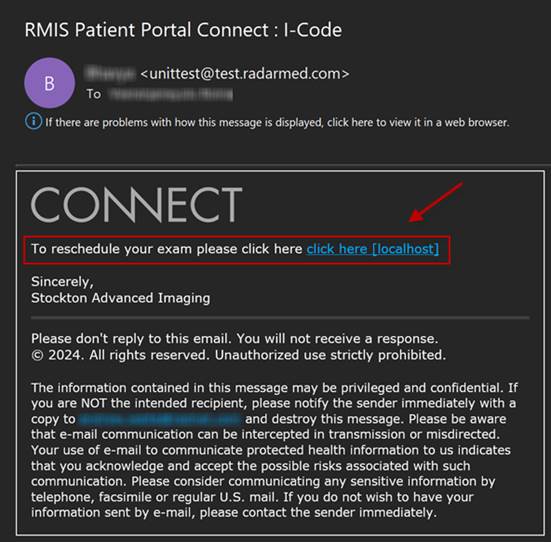
With these changes, patients will receive email or SMS notifications to reschedule their appointment using an iCode. Authentication is completed simply by confirming their date of birth. Once the patient’s information is validated, they will be directed to the scheduling screen where they can choose a preferred date/time for their appointment.
The duration for which the iCode remains valid can be configured via the ICodeRescheduleExpirationHours system setting.
Admin Patient Portal
Administrators can manually send reschedule requests via the new iCode Reschedule tab under User Management. Once the SEND ICODE TO RESCHEDULE button has been selected for the desired exam, the admin user will be prompted to select the method of communication.
Service Team Upgrade Instructions
No Service Team actions are necessary to deploy this feature; however, optional configuration is available:
Portals
Changes to applicationsettings.config
Set ICodeRescheduleSimpleAuth to Y allows validation by date of birth only.
This can be overridden at the practice level
Configure ICodeRescheduleReason with desired value for your installation.
If a value is not configured or found in the Canceled Study Reason look up table, the user will be redirected to the page that requires a reason to be entered before proceeding.
Configuration Instructions
System Administrators must complete the following actions to enable this feature:
RIS Client
Changes to SystemConfig Lookup Table
· Optionally, adjust ICodeRescheduleExpirationHours for your installation.
The following related settings were added or updated:
|
Setting |
Default |
Purpose |
|
ICodeRescheduleExpirationHours |
1 |
(Value=Hours as Integer), Set to [< 0] to disable, Default=[1] - Number of hours from the time an iCode is created to when it will expire for reschedule. A negative value indicates no hours added to the current date. |
Changes to ParagraphConfig Lookup Table
The following related settings were added or updated:
|
Setting |
Default |
Purpose |
|
PPICodeExpiredReschedule |
The iCode has expired or is no longer valid. |
The message to display to the patient portal user when user tries to access expired iCode to reschedule. |
|
PPICodeReschedule |
iCode Reschedule |
The message to display as tab name to the admin patient portal under users. |
|
PPRescheduleExamEmail |
To reschedule your exam please click here {0}. |
The message to display in the email when admin patient portal send exam to reschedule. |
|
PPScheduledExams |
Scheduled Exams |
The message to display as header to the admin patient portal under users under iCode Reschedule tab. |
|
PPSendICodeToReschedule |
Send iCode to reschedule |
The message to display on the button when admin patient portal send exam to reschedule. |
|
PPSendPatientICodeToAccessExam |
Send patient iCode to access this exam. |
The message to display to the patient portal user when user tries to send iCode. |